D
Discord#community-chat
Bridge conversations both ways, then manage the Discord tools your community needs from TulayBot.
7 days free · No payment details required.
Choose the tools you need. Availability labels match the module catalogue.
Keep conversations together with two-way chat, or send one-way Discord announcements to Telegram.
Set AutoMod rules, take moderation actions, and keep staff informed with logging.
Give members spaces to talk, roles to choose, a warm welcome, and useful community commands.
Create an opt-in listing for an eligible paid workspace. Listings need approval before they appear publicly.
Explore real dashboard screens using a fictional sample workspace.
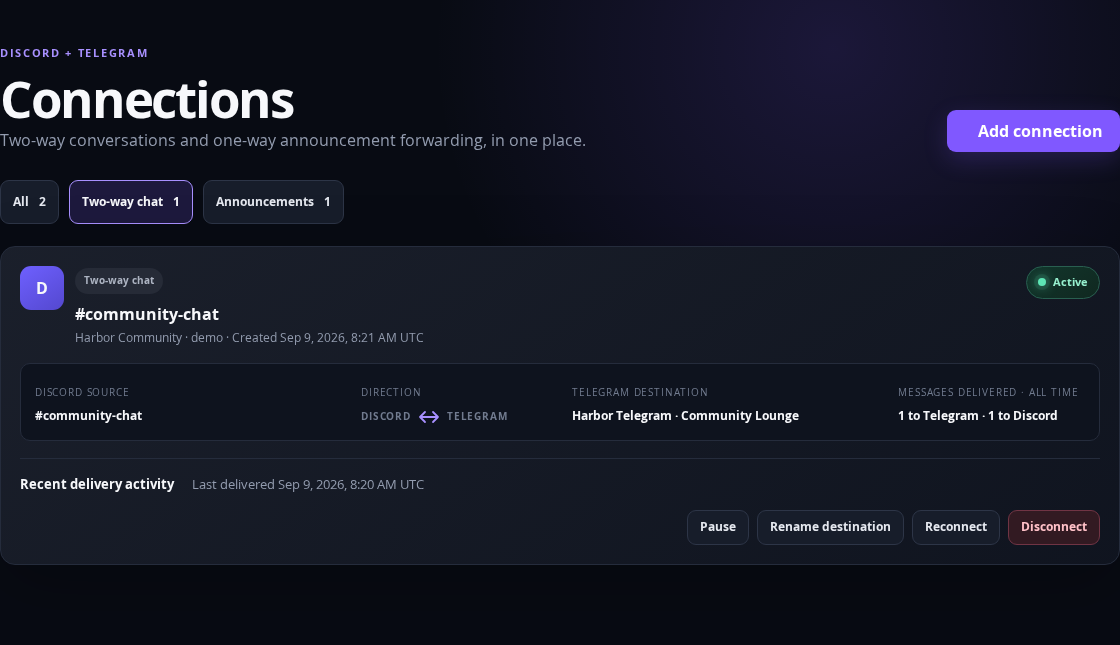
Keep one conversation moving across two platforms.
Discord and Telegram: messages and replies travel in both directions.
Screenshot could not load. Use Enlarge screenshot to open the image.
Use Discord modules on their own. Connect Telegram whenever you’re ready.
Open your own workspace. New customers begin a seven-day trial on their first successful sign-in.
Choose a server you manage, authorize the bot, then explicitly assign an available server slot.
Configure AutoMod, Voice Rooms, or other available tools. For Telegram, create a connection and use its linking code.
Already use TulayBot? Sign in with Discord to return to your existing account.
Every plan includes Connections and available Discord modules. Plan limits count activated servers and invited team seats.
The trial includes one server and no team seats. Server Discovery requires eligible paid access and listing approval. No separate purchase is required for the currently available Discord modules.
Compare all plans and billing details ↗No. Activate your Discord server and start with available Discord modules. Telegram is only needed when you want a chat or announcement connection.
A new customer’s seven-day trial starts after their first successful Discord sign-in. Signing in again or joining another workspace does not create a new trial. Paid subscriptions are a separate choice.
One slot activates one Discord server. Available Discord tools and Connections are included; Growth, Network and Flexible add team seats and appearance options.
Growth includes 2 team seats, Network 5, and Flexible 10. Owners grant module permissions to eligible teammates. Member Admin is available on Network and Flexible.
Server Discovery has the current catalogue status shown above. Eligible paid workspaces can submit an opt-in listing for review. Activating a server never automatically publishes it.
Bridge activity records delivery metadata. Saved commands, settings and moderation records have their own purposes and retention rules. Read the privacy policy for details.
Review the setup steps · The full Help & setup guide is in your dashboard after sign-in.
Join our Discord server to meet other TulayBot users, ask questions, and contact us for support.
Start with one server. Choose your tools. Bring Telegram along when you need it.